Microchip M2S Hello FPGA Kit
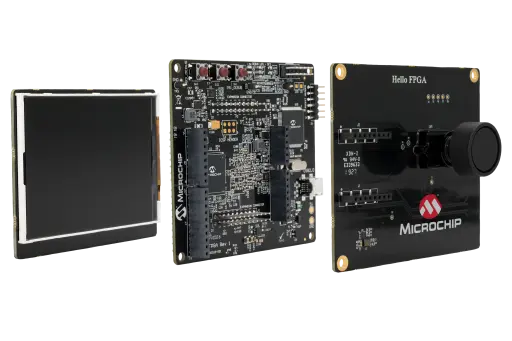
Overview
The Microchip M2S Hello FPGA Kit is a low-cost, compact, entry-level FPGA platform for users with low to medium FPGA experience. It supports powerful demos in image processing, signal processing, and artificial intelligence, and can measure live FPGA core power consumption while designs are running. Flash Freeze mode lets users freeze a design while maintaining the I/O state for low power applications. The kit also includes Arduino and mikroBUS connectors for prototyping and expansion.
The Zephyr board target for this port is m2s_hello_fpga_kit/m2s010.
Reference material for the kit is available in the official Microchip M2S Hello FPGA Kit product page and the related user guides and schematics published by Microchip.
Programming and debugging
The m2s_hello_fpga_kit board supports the runners and associated west commands listed below.
| flash | debug | rtt | debugserver | attach | |
|---|---|---|---|---|---|
| openocd | ✅ (default) | ✅ (default) | ✅ | ✅ | ✅ |
Building
Applications for the m2s_hello_fpga_kit/m2s010 board target can be built as
usual:
west build -b m2s_hello_fpga_kit/m2s010
Clock Configuration
The current SmartFusion2 port does not program the MSS clock tree from Zephyr. The actual CPU and peripheral clocks must already be configured in the SmartFusion2 hardware design, for example in the MSS/Libero configuration used to build the board image.
In Zephyr, the software-visible CPU frequency is taken from the devicetree CPU node:
&cpu0 { clock-frequency = <...>; }
That value is then used to derive:
CONFIG_SYS_CLOCK_HW_CYCLES_PER_SECthe
SystemCoreClockvariable used by the SmartFusion2 SoC port
The SmartFusion2-specific clock-controller node is currently used for UART clocking, while the remaining peripherals still use their local devicetree frequency properties. If the hardware clock configuration changes, update the devicetree to match the real board configuration. For example, an application overlay can override the CPU and peripheral clock description values:
&cpu0 {
   clock-frequency = <80000000>;
};

&clkc {
   clock-frequencies = <80000000 40000000>;
};
The devicetree values must describe the real hardware clocks. Changing them in Zephyr alone does not reprogram the SmartFusion2 clock hardware.
Flashing
The board uses the OpenOCD runner configuration from board.cmake and
support/openocd.cfg. Once the CMSIS-DAP/OpenOCD setup for the kit is
available in the host environment, the usual commands are:
west flash --runner openocd
west debug --runner openocd
Helpful Documentation
The following Microchip documents are useful when extending or upstreaming the board support.
Board Documentation
SoC Documentation
The quick start guide is useful for board bring-up, connector overview and kit contents. The device datasheet is the better top-level reference for package options, memory sizes, hard IP inventory and electrical capabilities. The programming guide is the better reference for flash programming, device configuration flows, boot/programming modes and debug-related setup.